> For the complete documentation index, see [llms.txt](https://panduan.inviday.id/llms.txt). Markdown versions of documentation pages are available by appending `.md` to page URLs; this page is available as [Markdown](https://panduan.inviday.id/en/getting-started/dashboard.md). Agents can also search and read this documentation through its [MCP server](https://panduan.inviday.id/~gitbook/mcp).
# Getting to Know the Dashboard
The Personal and Business dashboard menus, and how to switch between invitations.
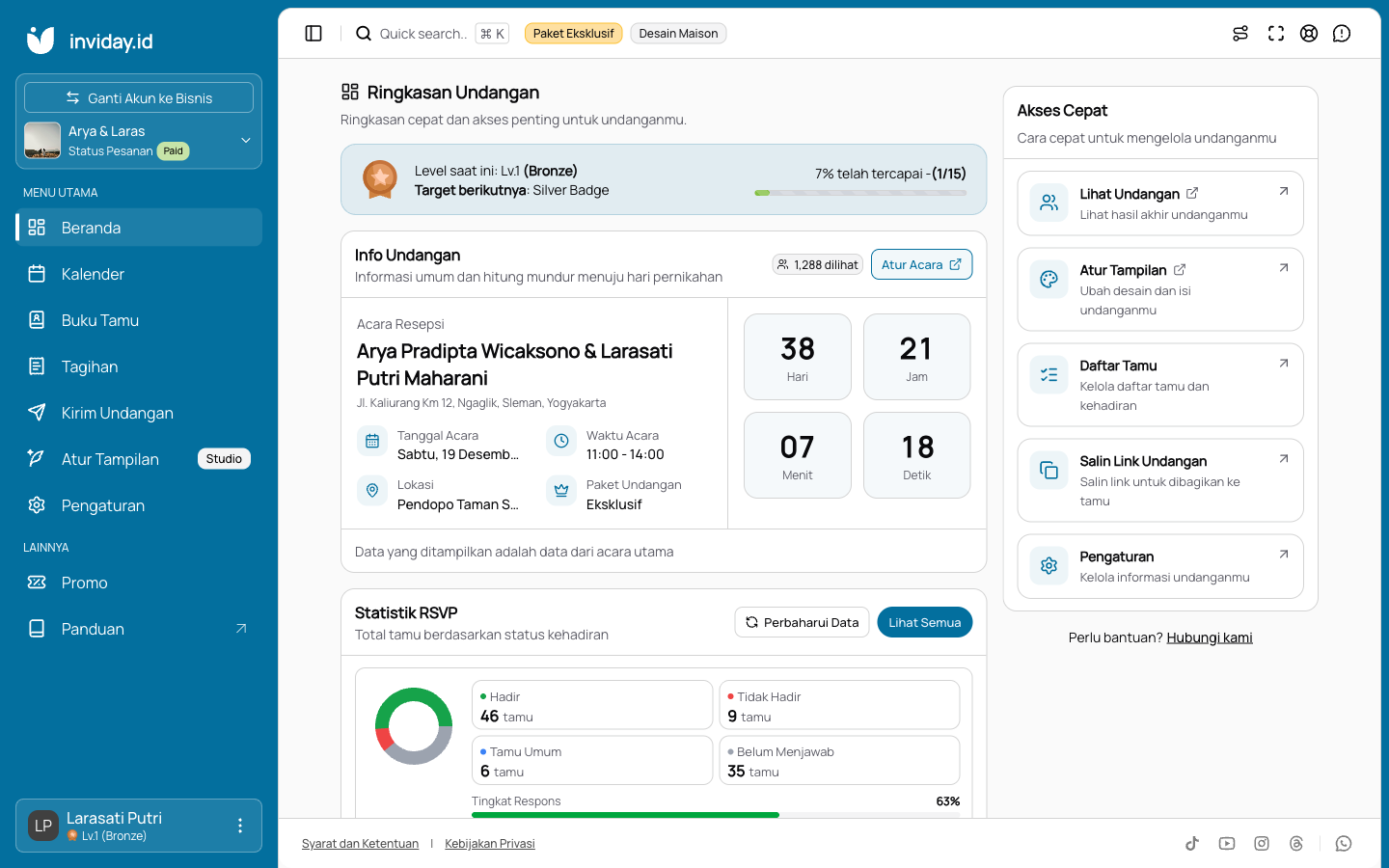
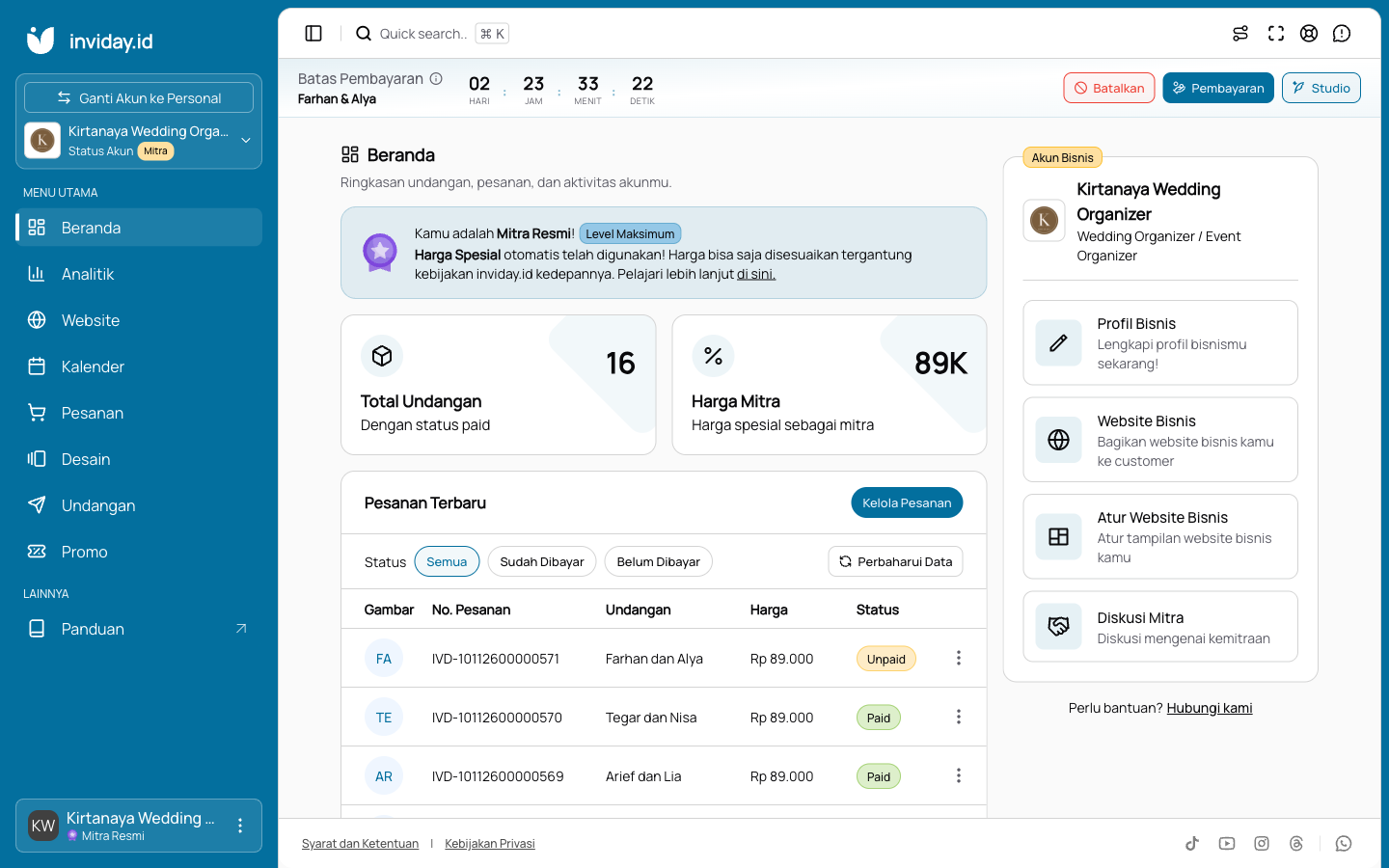
The dashboard looks different for Personal and Business accounts. The Personal dashboard focuses on the one invitation you've selected, while the Business dashboard shows all of your clients' invitations.
{% tabs %}
{% tab title="Personal Dashboard" %}
Personal Dashboard
| Menu | What's in it |
| -------------------- | ----------------------------------------------------------------------------------------------------------------------------------------------------------------------------- |
| **Home** | A summary of the selected invitation: order status, payment deadline, and shortcuts. |
| **Calendar** | A countdown to the big day and preparation steps. See [Event Calendar](https://panduan.inviday.id/en/guests-and-sharing/event-calendar.md). |
| **Guestbook** | The guest list, attendance, and wishes. See [Guestbook](https://panduan.inviday.id/en/guests-and-sharing/guestbook.md). |
| **Add-ons** | Extra features for the invitation, paid separately. See [Add-ons](https://panduan.inviday.id/en/plans-and-payment/add-ons.md). |
| **Billing** | Invitation and add-on orders, payments, and invoices. See [Payment](https://panduan.inviday.id/en/plans-and-payment/payment.md). |
| **Send Invitation** | Send personal links to guests. See [Send Invitations](https://panduan.inviday.id/en/guests-and-sharing/send-invitations.md). |
| **Customize Design** | Opens Studio. See [About Studio](https://panduan.inviday.id/en/studio/about-studio.md). |
| **Settings** | Website address, title, and SEO. See [General Settings](https://panduan.inviday.id/en/studio/general-settings.md). |
| **Promos** | The promos you can use. |
| **Referral** | Your referral code and link, the friends you invited, and your free invitations. See [Referral Program](https://panduan.inviday.id/en/plans-and-payment/referral-program.md). |
To switch to another invitation, click the invitation info card in the sidebar, then choose the invitation or click **All invitations**.
{% endtab %}
{% tab title="Business Dashboard" %}
Business Dashboard
| Menu | What's in it |
| --------------- | ----------------------------------------------------------------------------------------------------------------------------------------------------------------------------- |
| **Home** | A summary of invitations and orders, including invitations close to their payment deadline. |
| **Analytics** | Total invitations, best-selling designs, order statuses, and the best promos for you. |
| **Website** | Your business website and custom domain. See [Business Website and Custom Domain](https://panduan.inviday.id/en/account-types/business-website-and-domain.md). |
| **Calendar** | All your clients' events in one calendar. See [Event Calendar](https://panduan.inviday.id/en/guests-and-sharing/event-calendar.md). |
| **Orders** | All orders, including add-on orders, payment statuses, and invoices. |
| **Designs** | The design catalog, for creating new invitations. |
| **Invitations** | All of your clients' invitations. Open one to go to its Studio. |
| **Promos** | The promos you can use. |
| **Referral** | Your referral code and link, the friends you invited, and your free invitations. See [Referral Program](https://panduan.inviday.id/en/plans-and-payment/referral-program.md). |
In the Business dashboard, each invitation's Guestbook, Event Calendar, and [Add-ons](https://panduan.inviday.id/en/plans-and-payment/add-ons.md) open from that invitation's Studio.
{% endtab %}
{% endtabs %}
The **Guide** menu in both dashboards opens this guide.
## Changing your account type
You can change your account type at any time from the invitation info card (Personal dashboard) or the business profile card (Business dashboard):
* **Switch to Business**: you need a verified phone number and business details. If you don't have them yet, you're asked to fill them in first.
* **Switch to Personal**: you need at least one invitation.
Your invitations and orders stay after you change the account type.