> For the complete documentation index, see [llms.txt](https://panduan.inviday.id/llms.txt). Markdown versions of documentation pages are available by appending `.md` to page URLs; this page is available as [Markdown](https://panduan.inviday.id/en/plans-and-payment/payment.md). Agents can also search and read this documentation through its [MCP server](https://panduan.inviday.id/~gitbook/mcp).
# Payment
Pay for an invitation with a bank Virtual Account or GoPay/QRIS.
An invitation stays active forever once its order is paid. Pay before the [free trial](https://panduan.inviday.id/en/plans-and-payment/free-trial.md) ends; after that, the order is canceled automatically.
{% hint style="warning" %}
Check the main event date before you pay. Once it's paid, the date can only be changed up to space.vars.date\_change\_limit times, and only before the event day. See [Event List](https://panduan.inviday.id/en/studio/event-list.md#changing-the-main-event-date).
{% endhint %}
## What's on the bill
The total is worked out from:
1. The **plan price** you chose.
2. The **level discount**, from your [user level](https://panduan.inviday.id/en/getting-started/user-levels.md) when the invitation was created.
3. The **promo discount**, if you use a [promo code](https://panduan.inviday.id/en/plans-and-payment/promos.md) or a promo from the [Referral Program](https://panduan.inviday.id/en/plans-and-payment/referral-program.md).
4. The **admin fee**. It isn't charged on free orders or Partner orders.
{% hint style="info" %}
[Add-on](https://panduan.inviday.id/en/plans-and-payment/add-ons.md) orders are paid separately from the invitation order, at the listed price, without level discounts or promos.
{% endhint %}
## How to pay
{% stepper %}
{% step %}
### Open the order
Open the **Billing** menu (Personal account) or **Orders** (Business account), then open the unpaid order.
{% endstep %}
{% step %}
### Use a promo (optional)
Enter a code in the **Promo Code** field and click **Check Promo**, or use the best promo suggested.
If you signed up with a referral code, the new friend discount is already applied to your first invitation and shown on the referral card. See [Referral Program](https://panduan.inviday.id/en/plans-and-payment/referral-program.md#using-the-new-friend-discount).
{% endstep %}
{% step %}
### Create the payment
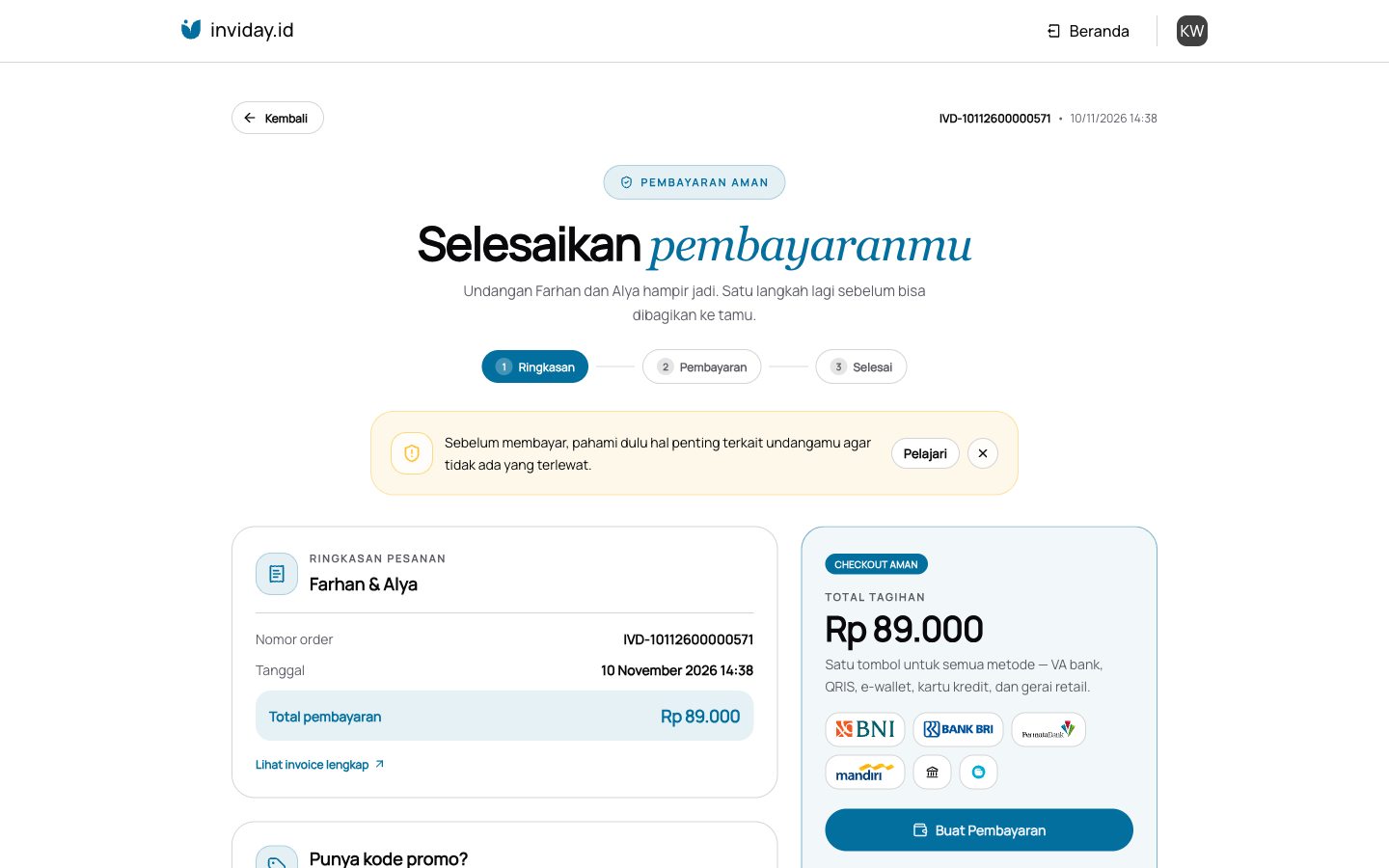
Click **Create Payment**, then choose a method:
* **Virtual Account**: BNI, BRI, Permata, Mandiri, or another bank.
* **GoPay/QRIS**: scan the QR code with GoPay or any payment app that supports QRIS.
Payments are processed by Midtrans.
The payment page
{% endstep %}
{% step %}
### Complete the payment
Follow the instructions for the method you chose. The status is verified automatically, then you're taken to Studio, or to the **Add-ons** menu for an add-on order.
{% endstep %}
{% endstepper %}
If the total comes to Rp0 because of a promo or a [referral reward](https://panduan.inviday.id/en/plans-and-payment/referral-program.md#using-a-free-invitation), the payment page shows **Your invitation is free!**. Click **Complete Order** to activate the invitation without paying.
{% hint style="info" %}
Changing the plan or promo after creating a payment cancels the old payment session, because the total changes. Create a new payment to continue.
{% endhint %}
## Invoice
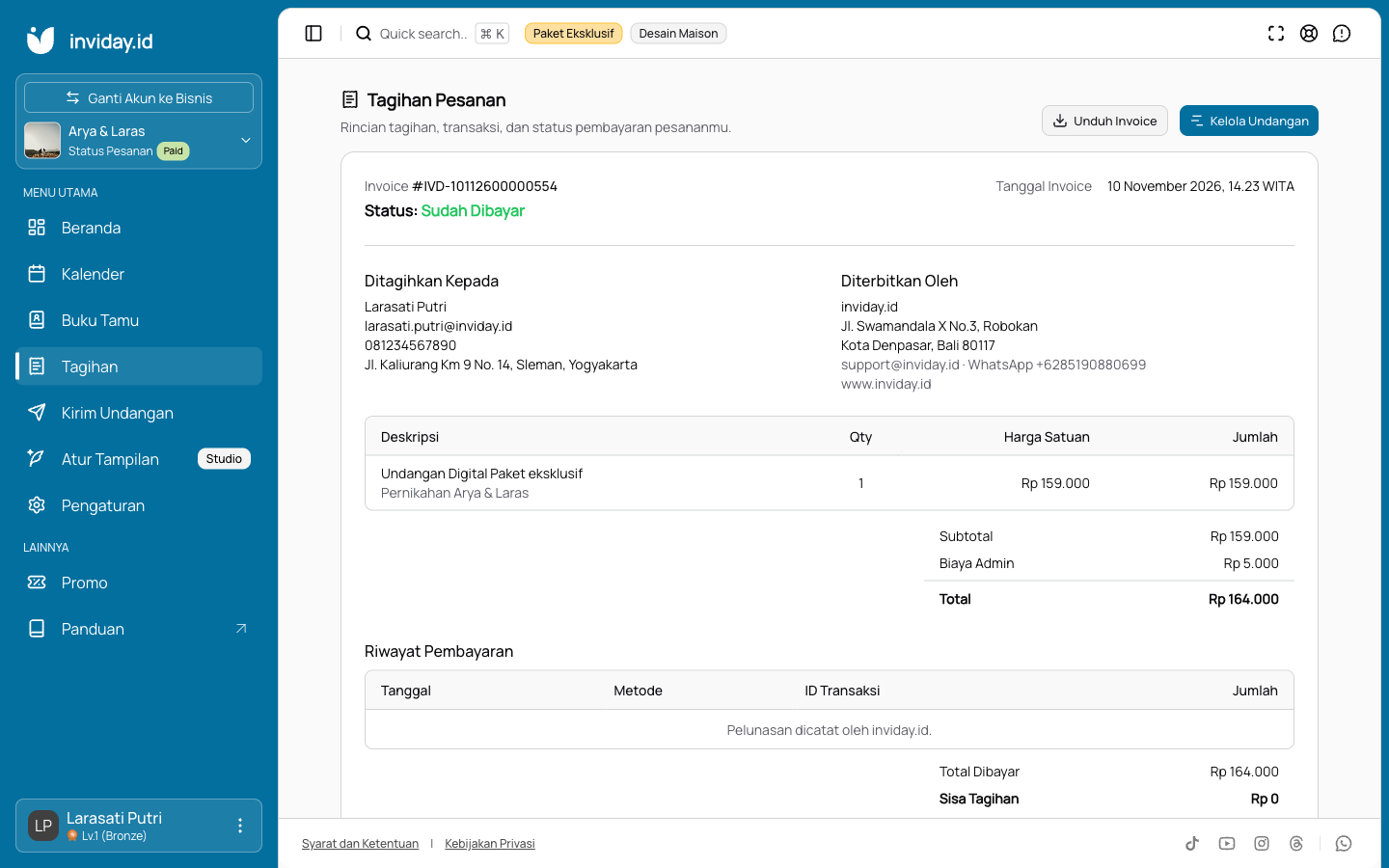
Once the order is paid, open its details to see the invoice, then click **Download Invoice** to save or print it. The invoice lists the plan price, level discount, promo, admin fee, total, and payment history.
The bill of a paid order
## Canceling a bill
On the payment page, click cancel bill and confirm. The unpaid bill is canceled, and you can create a new invitation at any time.
## Payment not verified?
If you've paid but the status hasn't changed, open the payment page again so the status is checked again. If it still hasn't changed, contact us through the [Help Center](https://panduan.inviday.id/en/more/help-center.md) with your proof of payment.