> For the complete documentation index, see [llms.txt](https://panduan.inviday.id/llms.txt). Markdown versions of documentation pages are available by appending `.md` to page URLs; this page is available as [Markdown](https://panduan.inviday.id/en/studio/event-list.md). Agents can also search and read this documentation through its [MCP server](https://panduan.inviday.id/~gitbook/mcp).

# Event List

Add events, sessions, participants, and a Google Maps location.

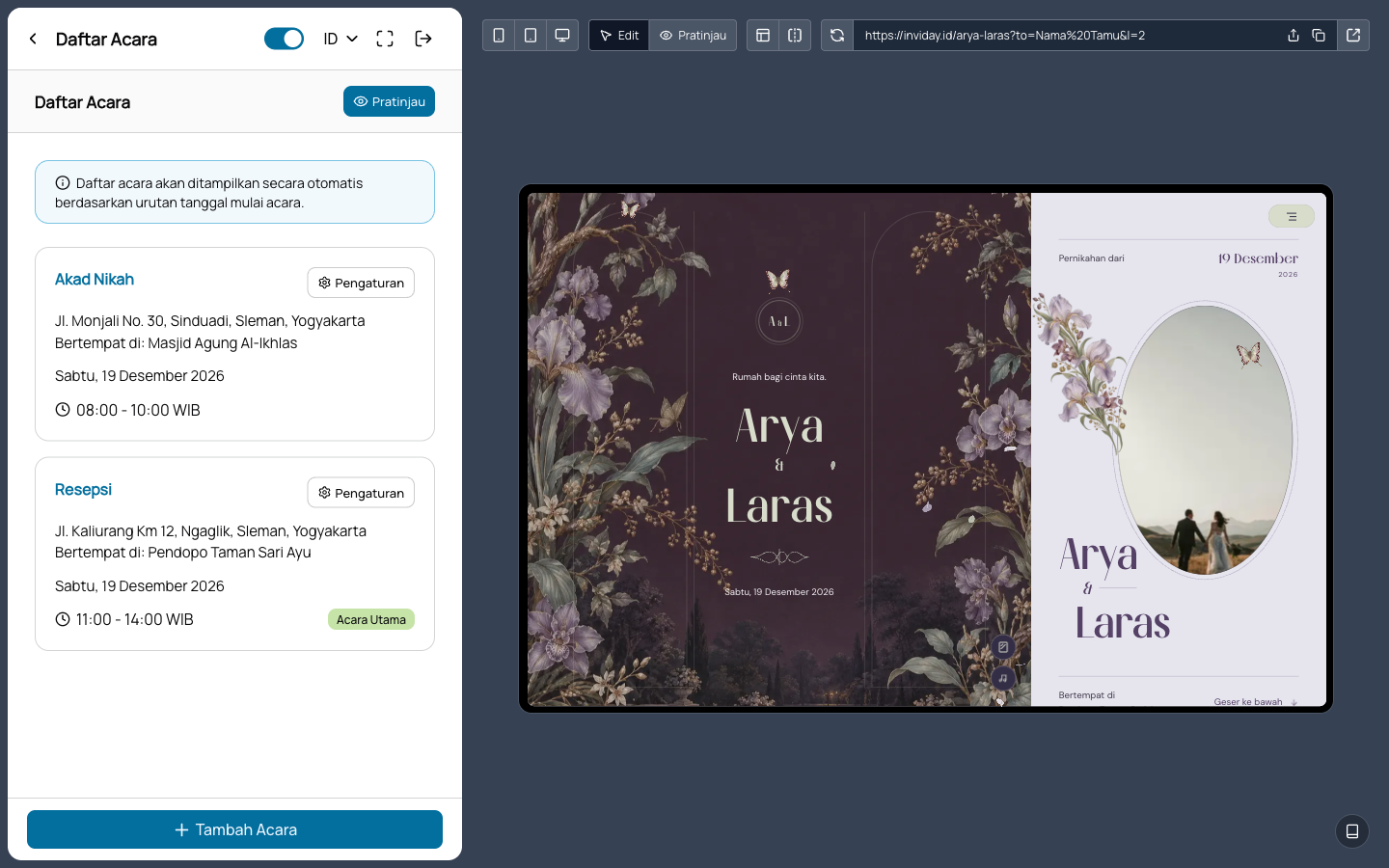
The **Event List** menu in Studio holds the wedding's events, such as the akad, the blessing, and the reception. Events show on the invitation automatically, sorted by start date. You can add up to 10 events.

<figure><img src="https://content.gitbook.com/content/W7QvsP5yqX9K1k6YI03Q/blobs/iGMyO2nGDkwxOBO9qScV/inviday-panel-events.png" alt="The Event List menu with an Akad Nikah and a Reception"><figcaption><p>The Event List menu; the Reception is marked as the Main Event</p></figcaption></figure>

## Adding an event

Click **Add Event**, then fill in:

| Field                                        | Details                                                                          |
| -------------------------------------------- | -------------------------------------------------------------------------------- |
| **Event Name**                               | For example, Wedding Reception.                                                  |
| **Timezone**                                 | WIB, WITA, or WIT. The event's times are shown in this time zone to every guest. |
| **Start Date**, **Start Time**, **End Time** | Leave End Time empty if the event runs until it's over.                          |
| **Event Venue** and **Address**              | For example, Main Hall, 123 Example Street.                                      |
| **Google Maps Link**                         | The location for the map and the directions button.                              |

### Getting a Google Maps link

1. Open Google Maps and search for the venue.
2. Select the place, then tap **Share**.
3. Tap **Copy link**, then paste it into the **Google Maps Link** field.

## Main event

One event is marked as the **Main Event**. Its date is used for the countdown, Save the Date, and the [Event Calendar](https://panduan.inviday.id/en/guests-and-sharing/event-calendar.md). The main event can't be deleted.

In a new invitation, the main event date is set to <code class="expression">space.vars.default\_event\_months</code> months after the invitation is created. Replace it with your event date before you pay.

### Changing the main event date

These rules only apply to the main event. Other events' dates can be changed freely at any time.

| Invitation status   | Changing the main event date                                                                               |
| ------------------- | ---------------------------------------------------------------------------------------------------------- |
| Free trial (unpaid) | Free, no limit.                                                                                            |
| Paid                | Up to <code class="expression">space.vars.date\_change\_limit</code> times, and only before the event day. |

Once the invitation is paid:

* When you save a new date, a **Change Main Event Date** window appears showing how many changes you have left. Click **Yes, Change Date** to continue.
* Changing the time on the same day, for example from 10:00 to 11:00, doesn't count as a date change.
* From 00:00 on the event day, in the event's time zone, the date is locked. The time, venue, and the rest of the event can still be changed.
* Once you've used up your changes, the **Start Date** field is locked.

{% hint style="warning" %}
Make sure the main event date is right before you pay. If the event is postponed on the event day, contact us through the [Help Center](https://panduan.inviday.id/en/more/help-center.md).
{% endhint %}

## Event sessions

Sessions split guests into different arrival times, for example Session 1 at 11:00 and Session 2 at 13:00. Open the **Event Session List** of an event, then click **Add Session** and fill in the **Session Name**, **Start Time**, and **End Time** (up to 10 sessions per event).

When you [send the invitation](https://panduan.inviday.id/en/guests-and-sharing/send-invitations.md), choose an **Attendance Session** so guests see their session's time. The session name goes into the invitation link, so keep it as short as you can.

## Event participants

Event participants are people who appear at an event other than the main event, such as performers or family members. Open the **Event Participant List**, then click **Add Participant** and fill in the **Participant Photo**, **Full Name**, and **Social Media** (up to 10 participants).
